How to Reset JBL Quantum 610 : A Complete Guaid
Learn how to reset JBL Quantum 610 to fix wireless connection, audio, and microphone issues and restore smooth gaming performance easily.
- Turn headset completely off
- Hold power button firmly
- Wait until indicator flashes
- Release and restart headset
- Test audio connection again
JBL Quantum 610 is a high-powered wireless gaming headset with an aim of providing an immersive sound, a long-lasting comfort and the stable connection across the platforms. Nonetheless, as any electronic product, it can sometimes have some problems like distorted sound, failure to pair, or unresponsive buttons. A quick and safe way to get the headset back to a smooth operation is usually a restart. This is the step-by-step guide on how to reset your JBL Quantum 610 so that you can enjoy a perfect gaming experience again.

Understanding When a Reset Is Needed
There are also complaints of many users experiencing such problems as the disproportionate sound balance, the non-proper functioning of the sidetone, or the inability of the headset to maintain a stable wireless connection. Those problems may interrupt the game and give rise to unreasonable frustration, particularly in the competitive sessions. A clean reformat will update any internal software and the headset will work as intended and you will be able to play without any problems.
Soft Reset Method for JBL Quantum 610
The simplest is a soft reset which is normally sufficient to resolve normal problems without disturbing saved settings or sound profiles. In order to do a soft reset, one needs to switch off the headset then wait ten seconds and switch on again. This reboot is fast and clears any small glitches, re-formats the internal memory and stabilizes wireless connections without deleting any custom settings.
Soft resets are particularly effective when you experience some unexpected issues with the audio or the headset is no longer able to react to the changes in the volume. It is the non-destructive method of restoring performance and it is advisable to perform it before any further resets. It does not need any tools or additional procedures and, therefore, it is usually the initial choice of the gamer who wants to troubleshoot quickly and efficiently.
Factory Reset Procedure
A factory reset can be done in the event that a soft reset does not fix your problems. Press the Volume Up and Volume Down buttons at the same time in approximately five seconds until the headset restarts. This will remove temporary data and reset the headset to default settings removing corrupted profiles and incorrectly set Bluetooth or wireless pairing data.

The factory reset comes in particularly handy when the headset will not connect to the dongle or will not give any clear audio regardless of the settings you change. Although it will restore sound profiles, equalizer settings, and customized settings, it will give your JBL Quantum 610 a clean slate. Once your audio settings are reset, you can reuse your preferred audio settings by using the JBL Quantum ENGINE software.
Re-Pairing the Headset With the USB Dongle
When you have done a reset, you might have to re-pair the wireless dongle with your JBL Quantum 610. Connect the dongle with your PC or console and turn on the headset. Press the pairing button of the dongle until the LED light begins to blink and press the pairing button of the headset. Once the two lights become solid, the connection has been restored and it is now ready to be used.
This is necessary due to the fact that, sometimes resetting clears the memory of pairing and the headset and dongle become incommunicado. Re-pairing will maintain a consistent wireless performance and will aid in removing audio delay or unexpected connection failure. After successful re-pairing, the headset must be able to perform without any connectivity issues during all of your gaming.
Updating Firmware for Better Performance
The updates of the firmware also have a significant role in the maintenance of the JBL Quantum 610. Old software may also cause imbalance in audio, microphone malfunction or problems that cannot be solved after reconfiguring the headset. Plugging the headset into your PC and updating it via the Quantum ENGINE software will be a sure way to have the latest improvements and bug fixes.
Constant updates also make it compatible with newer gaming platforms and game consoles. They usually come with performance improvements, improved sound processing and more reliable wireless connectivity. A clean reformat and the latest firmware always provides your headset a good opportunity to work at its optimum and provide you with a smooth immersive gaming experience.
Common Issues Solved by Resetting
The reboot of JBL Quantum 610 has the potential to fix a long list of issues, including microphone distortion, echo sounds, and sudden disconnection during the play. Such problems usually are caused by the temporary software clashes or damaged settings accumulating over time. A reset would restore your headset to a clean state and all the features would work as intended.
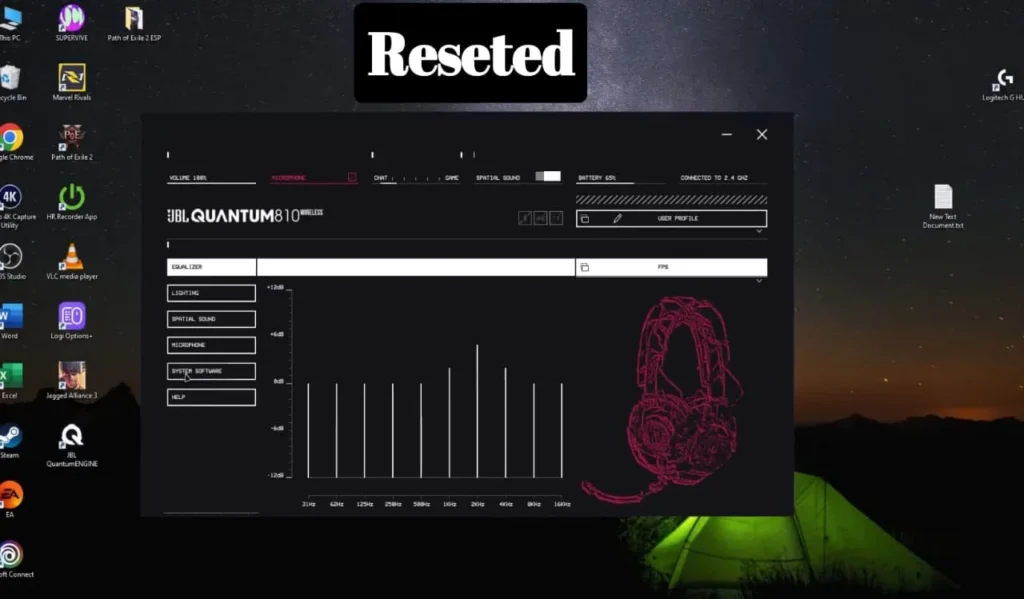
Gamers also complain that they have gotten better sound quality, clearer mics and that their wireless stability is better after doing a proper reset. In case your headset often loses its connection during some high-paced online games, a reset will remove delays and ice-creaming audio. It is the fast and efficient fix that can be done without any advanced technical skills and that reinforces the usual performance.
| Tip | What To Do |
|---|---|
| Charge fully | Plug in for 2–3 hours |
| Try another cable | Use original/known-good USB |
| Clean charging contacts | Gently remove dust/lint |
| Reset power | Hold power button ~10–15 sec |
| Try another power source | Wall adapter instead of USB hub |
My Personal Experience
I recently faced an issue when my JBL Quantum 610 suddenly stopped connecting properly to my PC. I tried reconnecting the wireless dongle, restarting my system, and checking audio settings, but the sound kept cutting out and the microphone didn’t respond. It was frustrating because I use this headset regularly for gaming and voice chats.
I then decided to reset the headset by following the proper reset method. The steps were simple and didn’t take much time to complete. After resetting, the connection stabilized and both audio and microphone started working normally again.

FAQs for How to Reset JBL Quantum 610
Final Thoughts
JBL Quantum 610 can be easily, but effectively, reset to restore its audio performance and address the long-standing problems. The above-described reset procedures can be successfully used in case of connectivity drop, sound distortion, microphone issues, and many others. Once the headset has been reset and re-paired, you will be able to get back to listening to the rich, immersive sound and playing a smooth game without being interrupted.
In case there is still a problem with your headset, even after using all the possible reset steps, then there could be a problem with the hardware that needs to be supported by an expert. Nevertheless, the majority of problems can be resolved by simple resets, and this is why they are the most appropriate as the first step to comfortable and consistent gaming with your JBL Quantum 610.